Posts

Showing posts with the label Redhat 7

Redis Cluster basic setup
Image
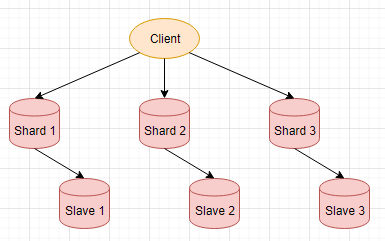
Disclaimer: Make sure to use Redis 5 to follow along this quick guide, if using the older distribution, please refer to  Official Documentation  for more information. This works on Redhat 7, to install Redis 5 #Set up repo rpm -ivh https://rpms.remirepo.net/enterprise/remi-release-7.rpm # install redis yum install -y redis --enablerepo=remi This creates 3 shards and 3 replicas Client we are using here is the redis-cli command line tool ShardX, SalveX are redis-server processes #create conf files node1.conf ------------------ port 7001 cluster-enabled yes cluster-config-file cluster-node-1.conf cluster-node-timeout 5000 appendonly yes appendfilename node-1.aof dbfilename dump-1.rdb . . . node6.conf ------------------ port 7006 cluster-enabled yes cluster-config-file cluster-node-6.conf cluster-node-timeout 5000 appendonly yes appendfilename node-6.aof dbfilename dump-6.rdb #Start each redis-server node ----------------...

Postgres 10 setup and testrun on Redhat Linux 7

This is just a quick guide to get up and running with Postgres 10 on redhat linux 7 As of the writing of this quick guide, yum install postgresql-server does not allow you to install version 10. Instead, we do As root: yum install -y https://download.postgresql.org/pub/repos/yum/10/redhat/rhel-7-x86_64/pgdg-redhat10-10-2.noarch.rpm Install Client Package yum install -y postgresql10 Install Server Package yum install -y postgresql10-server I always seem to have to initialize the database manually, so here it is. /usr/pgsql-10/bin/postgresql-10-setup initdb We need to now switch to os user postgres su - postgres Run psql command line console, aka PostgreSQL interactive terminal -bash-4.2$ psql psql (10.5) Type "help" for help. postgres=

Issue encountered and fix - Installing MongoDB on Redhat 7.x via yum

This is the version of redhat I am running [root@msdlva-dsnops03 ~]# lsb_release -a LSB Version:    :core-4.1-amd64:core-4.1-noarch:cxx-4.1-amd64:cxx-4.1-noarch:desktop-4.1-amd64:desktop-4.1-noarch:languages-4.1-amd64:languages-4.1-noarch:printing-4.1-amd64:printing-4.1-noarch Distributor ID: RedHatEnterpriseServer Description:    Red Hat Enterprise Linux Server release 7.3 (Maipo) Release:        7.3 Codename:       Maipo To start, we need to configure mongodb-enterprise repo https://docs.mongodb.com/manual/tutorial/install-mongodb-enterprise-on-red-hat/ This is the repo I used [root@msdlva-dsnops03 ~]# vi /etc/yum.repos.d/mongodb-enterprise.repo [mongodb-enterprise] name = MongoDB Enterprise Repository baseurl = https://repo.mongodb.com/yum/redhat/$releasever/mongodb-enterprise/3.4/$basearch/ gpgcheck = 1 enabled = 1 gpgkey = https://www.mongodb.org/static/pgp/server-3.4.asc [root@msdlva-dsnops0...