Posts

Showing posts with the label mongodb enterprise

MongoDB tips: get config information

db._adminCommand( {getCmdLineOpts: 1}) db._adminCommand({getParameter:"*"}) rs0:PRIMARY> db._adminCommand( {getCmdLineOpts: 1}) {         "argv" : [                 "mongod",                 "--config=/data/configdb/mongod.conf",                 "--dbpath=/data/db",                 "--replSet=rs0",                 "--port=27017",                 "--bind_ip=0.0.0.0",                 "--auth",                 "--keyFile=/data/configdb/key.txt"         ],         "parsed" : {                 "config" : "/data/configdb/mongod.conf",       ...
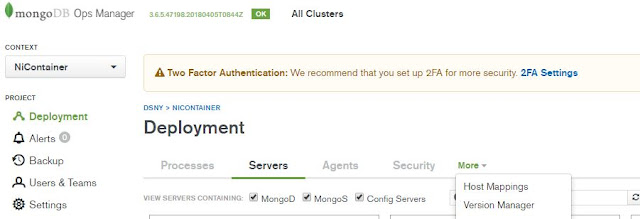
MongoDB OpsManager 3.6.5 version manifest binary location change

Image
I ran into an issue after I initiated a backup job through opsmanager, which indicated that the db version directory is not available. First I check my version manifest to see if the version that the daemon process is looking for is checked Click on version manager Then we can select the MongoDB versions Since I can see these are checked, I went to the default location where these db versions are stored, then I realized the default location simply does not have enough room to store all these binaries. I had to change the location to store them Default location where OpsManager would download the binary for various versions of MongoDB is /opt/mongodb/mms/mongodb-releases/, we can change it by clicking into admin on top right corner of the page , then General > Ops Manager Config > Miscellaneous, scroll down to Versions Directory and change the value there. Once the change has been made, go back to the terminal and restart the ops manager by running service mon...

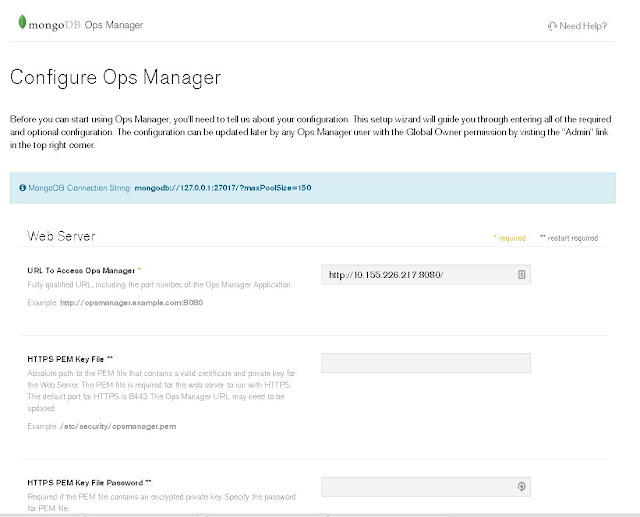
MongoDB Ops Manager Basic Installation and Configuration

Image
This post is just a quick guide of MongoDB Ops Manager basic installation and configuration. The bare minimum of getting an instance of MongoDB Ops Manager up and running. We will be working with the latest version of the OpsManager, release version 3.4.7. Prerequisite: To start fresh, we remove any mongodb related RPM. I had Mongod installed as well, therefore, I have extras to be removed. [root@msdlva-dsnops01 ~]# yum autoremove $(rpm -qva | grep mongo) Loaded plugins: langpacks, product-id, rhnplugin, search-disabled-repos, subscription-manager This system is receiving updates from RHN Classic or Red Hat Satellite. Resolving Dependencies --> Running transaction check ---> Package mongodb-enterprise.x86_64 0:3.4.6-1.el7 will be erased ---> Package mongodb-enterprise-mongos.x86_64 0:3.4.6-1.el7 will be erased ---> Package mongodb-enterprise-server.x86_64 0:3.4.6-1.el7 will be erased ---> Package mongodb-enterprise-shell.x86_64 0:3.4.6-1.el7 will be erased...

MongoDB tip: mongodb security with user authentication and role assignment, limiting access via mongodb bi connector

Image
This post should be treated as continuation of the previous post on authentication , I will also use mysql workbench to display how this can enhance the access control to mongod via MongoDB BI Connector. Please refer to  this post and/or this post for more information on MongoDB BI Connector. From previous posts, we have created an "admin" user with admin role "root", here is what we had created. minerva-reports:PRIMARY> db.getUser("admin") {         "_id" : "admin.admin",         "user" : "admin",         "db" : "admin",         "roles" : [                 {                         "role" : "root",                         "db" : "admin"                 }        ...

MongoDB tip: Apply authentication option to a replica set, issue encountered and fix

Assuming we have a replicate set started as such, please refer to article 1  or article 2 to see how to configure a replica set if you haven't already done so and still have issues. Output of ps -ef | grep mongod root     20706     1  0 15:09 ?        00:00:01 mongod --port 31111 --replSet biDemo --dbpath /data/mongodb/demo1 --logpath /data/mongodb/demolog/1.log --fork  root     20943     1  0 15:10 ?        00:00:01 mongod --port 31112 --replSet biDemo --dbpath /data/mongodb/demo2 --logpath /data/mongodb/demolog/2.log --fork root     21101     1  0 15:11 ?        00:00:01 mongod --port 31113 --replSet biDemo --dbpath /data/mongodb/demo3 --logpath /data/mongodb/demolog/3.log --fork  Log into primary and add user, you will need at least one admin user to start and administer mongod with authentication enabled MongoDB Ente...