Posts

Interesting Tip: Run query against MongoDB using SQL Server

Image
Disclaimer: This is just a quick setup I had to do to expose MongoDB to SQL Server user, this is still a work in progress because not everything works, only non string fields work so far, such as number and date, at least I haven't found a way to get around it.  Update: So far the major types that we typically query all work for me, such as varchar, int, and datetime. Components: SSMS, SQL Server v2008 (It should also work for 2012 or 2016) MongoDB 3.2.x MongoDB BI Connector v2.2 mysql-connector-odbc-5.3.9 I am going to jump directly to the setup on SQL Server as I have done a little bit of bi connector setups in the post1 , post2 , Please refer to them for setting that up. First, let's download the mysql-connector-odbc, here I have downloaded the latest version which is available to me, the 5.3.9 version. Then we simply need to install that on the server where we are going to set up our odbc connection. After the setup is complete, we can go to  ...
MongoDB tip: Mongo web shell

Perhaps this has been around for sometime, but as soon as I saw it, I just wanted to make a copy here,.I got it from here   Mongo web shell! simply click connect, and anyone can use this to get some practice on navigating through mongo shell!  Enjoy!

MongoDB Ops Manager Basic Installation and Configuration

Image
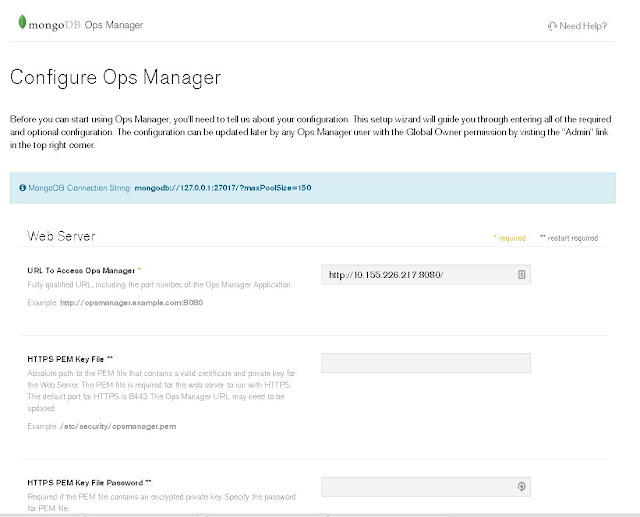
This post is just a quick guide of MongoDB Ops Manager basic installation and configuration. The bare minimum of getting an instance of MongoDB Ops Manager up and running. We will be working with the latest version of the OpsManager, release version 3.4.7. Prerequisite: To start fresh, we remove any mongodb related RPM. I had Mongod installed as well, therefore, I have extras to be removed. [root@msdlva-dsnops01 ~]# yum autoremove $(rpm -qva | grep mongo) Loaded plugins: langpacks, product-id, rhnplugin, search-disabled-repos, subscription-manager This system is receiving updates from RHN Classic or Red Hat Satellite. Resolving Dependencies --> Running transaction check ---> Package mongodb-enterprise.x86_64 0:3.4.6-1.el7 will be erased ---> Package mongodb-enterprise-mongos.x86_64 0:3.4.6-1.el7 will be erased ---> Package mongodb-enterprise-server.x86_64 0:3.4.6-1.el7 will be erased ---> Package mongodb-enterprise-shell.x86_64 0:3.4.6-1.el7 will be erased...

MongoDB tip: mongodb security with user authentication and role assignment, limiting access via mongodb bi connector

Image
This post should be treated as continuation of the previous post on authentication , I will also use mysql workbench to display how this can enhance the access control to mongod via MongoDB BI Connector. Please refer to  this post and/or this post for more information on MongoDB BI Connector. From previous posts, we have created an "admin" user with admin role "root", here is what we had created. minerva-reports:PRIMARY> db.getUser("admin") {         "_id" : "admin.admin",         "user" : "admin",         "db" : "admin",         "roles" : [                 {                         "role" : "root",                         "db" : "admin"                 }        ...

MongoDB tip: Apply authentication option to a replica set, issue encountered and fix

Assuming we have a replicate set started as such, please refer to article 1  or article 2 to see how to configure a replica set if you haven't already done so and still have issues. Output of ps -ef | grep mongod root     20706     1  0 15:09 ?        00:00:01 mongod --port 31111 --replSet biDemo --dbpath /data/mongodb/demo1 --logpath /data/mongodb/demolog/1.log --fork  root     20943     1  0 15:10 ?        00:00:01 mongod --port 31112 --replSet biDemo --dbpath /data/mongodb/demo2 --logpath /data/mongodb/demolog/2.log --fork root     21101     1  0 15:11 ?        00:00:01 mongod --port 31113 --replSet biDemo --dbpath /data/mongodb/demo3 --logpath /data/mongodb/demolog/3.log --fork  Log into primary and add user, you will need at least one admin user to start and administer mongod with authentication enabled MongoDB Ente...